Skip to content

SoundBooster — free sound & volume boosterSound booster
& AI audio studio.

Make your sound sound better. The free sound booster for Chrome — boost volume up to 600% without distortion, with a bass booster and audio equalizer — plus AI mastering, a stem splitter and free online audio tools.

Drop your track

Drag & drop or browse files

WAV, MP3, FLAC, OGG, M4A/AAC, Opus up to 250 MB. Decoded on your device — nothing is uploaded until you choose a tool that needs it.

  • Free sound booster
  • Works in your browser
  • Nothing uploaded without asking

Hear the difference

Before and after, in perfect sync.

Press play and flip between the original and the mastered version. Both run through the same engine you'll use on your own tracks.

Sample loop.wav

Synthesised demo mix · processed live in your browser

Mastered
0:00 / 0:00

Real processing, not a recording: EQ, compression, saturation, stereo widening and a look-ahead limiter. Loudness-matched comparisons of your own tracks are on the mastering page.

One place for your entire sound

From rough mix to finished release.

Mastering, stems, analysis and visuals share one engine and one library — so a project moves from idea to release without leaving your browser.

AI Mastering

Describe it. Hear it. Compare it.

Tell SoundBooster how the track should feel — “punchier drums, clearer vocals” — or let it analyse the mix. Every revision is rendered for real and loudness-matched, so you judge the tone, not the volume.

  • Six engineers with genuinely different processing
  • Reference mastering against a track you love
  • Voice input, presets, and unlimited undo
Try AI Mastering
Original
Mastered
“Make the bass punchier and the vocals clearer.”
DefaultSophiaAlexMarcusLunaKai
Stem Splitter

Pull any song apart.

Separate vocals, drums, bass and the rest — or go further with six stems and a full drum kit. Mix them with pan, mute and solo, then export stems, an instrumental or an a cappella.

  • 4 or 6 stems, or kick / snare / hats / toms / cymbals
  • Instrumental and a cappella in one click
  • Download a ZIP or send stems to the Studio
Split a track
Vocals
MS
Drums
MS
Bass
MS
Other
MS

Audio Tools

Measure everything. Fix the rest.

Check loudness the way streaming services do, see how much they'll turn you down, and convert, trim, tag, re-pitch or clean up files — all on your device.

  • LUFS, true peak and loudness-penalty preview
  • Converters, metadata / ID3 editor, trimmer
  • Spectrum analyser, speaker simulation, vocal remover
Open Audio Tools
LUFS MeterLoudness PenaltyConverterTag EditorAnalyzerTrimmerPitchSpeedNoise Remover

AI Visuals

Artwork that moves with the music.

Generate artist photos and album covers, and render audio-reactive visualizers and Spotify Canvas loops from your own song — sized for every platform.

  • Album covers and artist photos from a prompt
  • Canvas loops (9:16) and visualizer videos
  • Your own artist model — private to your account
Create visuals
Visualizer · 16:9
Album cover
Canvas · 9:16

Sound booster extension for Chrome

Every tab gets its own volume knob.

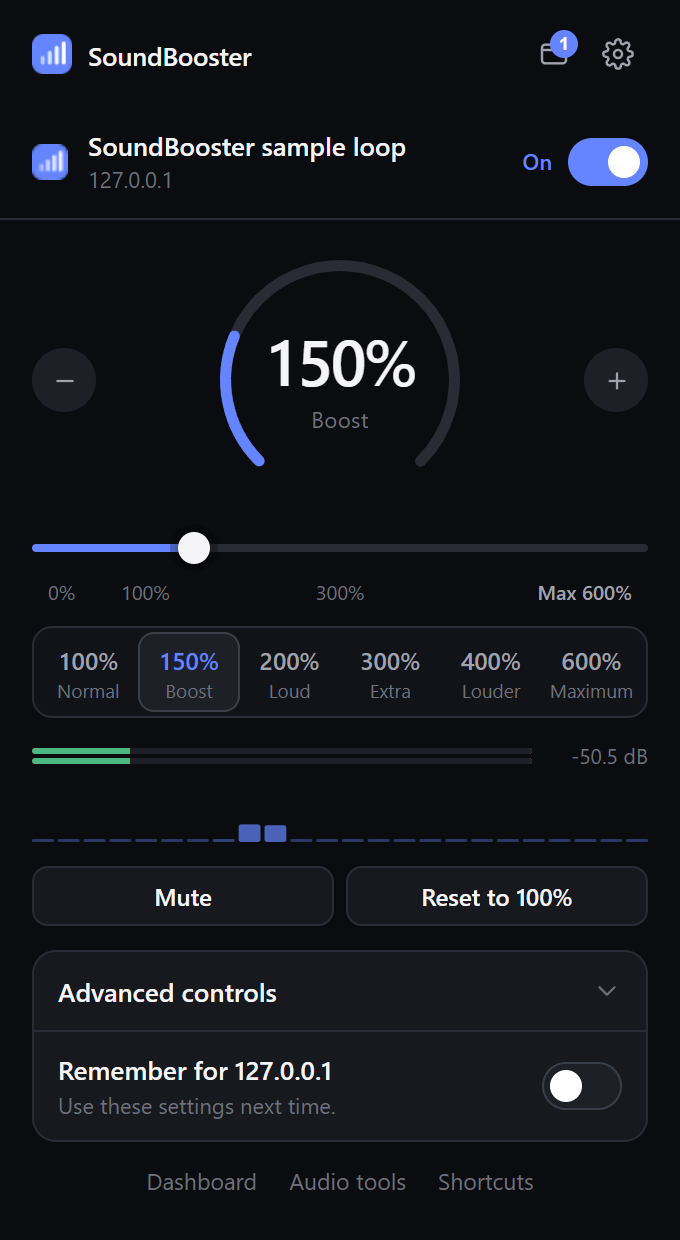
YouTube too quiet? A call you can barely hear? SoundBooster boosts the tab you choose above 100% — up to 600% — without touching the rest of your computer. Boost several tabs at once, turn off just one, and shape each with a bass booster and equalizer.

  • Boost volume up to 600% without distortion
  • Bass booster, treble, 5-band audio equalizer and stereo width
  • Per-tab volume control, remembered per site
  • Processed locally — nothing is recorded or uploaded
SoundBooster Chrome volume booster popup: a tab boosted to 150% with presets up to 600%, level meter and equalizer

Free

Everything is free.

No plans, no trials, no credit card. The sound booster, the studio, AI mastering and every audio tool are free for everyone.

  • Volume booster up to 600%
  • Every export format, up to 32-bit WAV
  • All audio tools and the studio
  • No account needed to start

AI features that run on outside services have a fair daily limit, so everyone gets a turn.

Questions

Sound booster FAQ

Everything people ask before they turn it up.

How do I make Chrome louder than 100%?

Chrome has no setting above 100%. Add the free SoundBooster extension, open the quiet tab and choose a preset — 150%, 200%, 300%, 400% — or drag up to the 600% maximum.

Is SoundBooster free?

Yes, completely. The sound booster extension, the studio, AI mastering and every audio tool are free — no plans, no trials and no credit card. AI features that run on outside services have a fair daily limit.

Does boosting to 600% distort the sound?

No. Instead of clipping loud peaks, SoundBooster uses a look-ahead limiter that turns them down smoothly just before they play, so audio stays clean even at 600%.

Does it work on YouTube, streams and calls?

Yes — it boosts any Chrome tab that plays sound and that Chrome lets extensions capture, including YouTube, web music players, Google Meet and Zoom's web client.

Is there a bass booster too?

Yes. The extension includes a bass booster (up to +12 dB), treble control and a 5-band audio equalizer, all per tab. For files, there's a free online bass booster.

Can I boost more than one tab?

Yes. Every tab has its own volume and equalizer, and you can turn off one tab while the others stay boosted.

Is my audio recorded or uploaded?

No. The extension processes tab audio on your computer and never records it. Browser tools decode files on your device too.

Turn it up.

100% free. No credit card, no installer — just your browser.

Your audio stays yours. When a feature needs a server, the page says so first. Privacy